Time tracking that works where our people work
Client: Canviz (internal project)
We built our own time tracker in-house, and it served us well, but only at a desk. Working with AI, one Canviz developer built on it to create CTime, a new app for phone, tablet and desktop. It took 15 working days, with no data migration and no disruption for our people.
Transcript
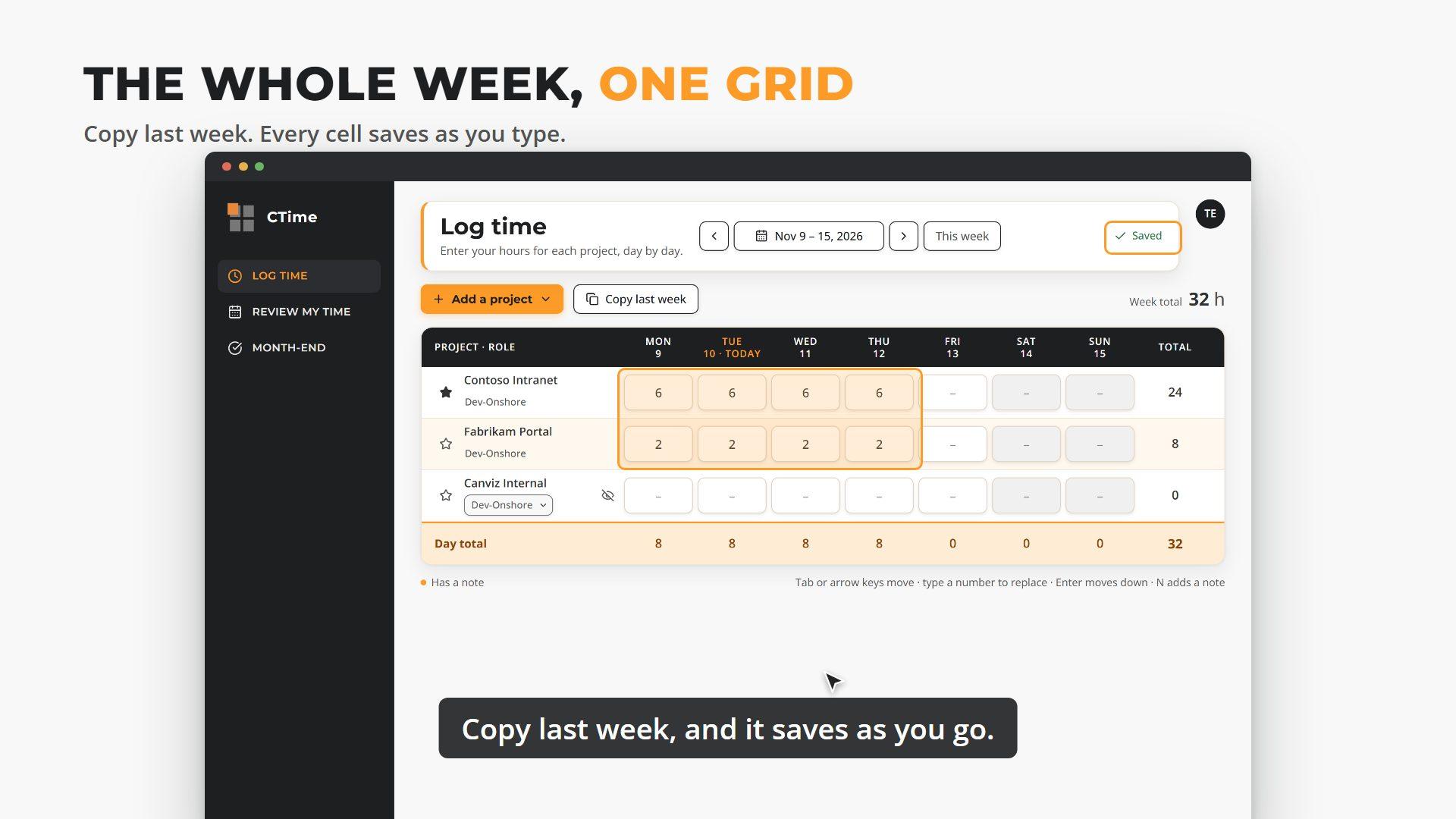
We built our own time tracker in-house, and it served us well. But it only worked at a desk, and logging a week took too many clicks. Reminders? Managers sent those by hand. Working with AI, we built CTime in about three weeks. On your phone, log a day in a few taps. On a tablet or desktop, the whole week is one grid. Copy last week, and it saves as you go. Before a timesheet is due, CTime sends the reminder. At month end, everyone confirms their hours. We built on what we already had, so nobody had to switch overnight, and reports and invoicing kept working. 92 features in 15 working days, by one developer with AI. What custom internal apps do you have that need a makeover?
At a glance
| Client | Canviz (our own team) |
| Starting point | Our own custom time tracker, built in-house |
| Challenge | Desktop-only, slow timesheets with no reminders |
| Delivered | 92 features in 15 working days · 19 Oct to 6 Nov 2026 |
| Built by | One developer, working with AI |
| Approach | Built on what we had: same data, old apps still running |
| Platform | Microsoft Azure · Microsoft Entra sign-in |
| Status | Pilot group live, full rollout next |
Results
The challenge: timesheets waited for a desk
Our time tracker was a custom app we built in-house, and it did its job, but only from a computer. Hours from client sites, travel days and meetings were entered late, from memory, or not at all until someone asked. We wanted to build on what we already had, fix those pains, and keep the change easy for our people.
- Desktop only. Time could only be entered from a computer, so entries waited until people were back at their desks.
- Too many clicks. Logging a week meant moving across several screens for every project and role.
- No reminders. Nothing told people a timesheet was due, so managers chased late hours by hand at month end.
The approach: build alongside, not instead of
A rewrite usually means a migration, a freeze and a risky cutover weekend. We skipped all three. Our in-house app already held all our hours and projects, so CTime builds on it: it uses the same database as our existing apps, reading and writing the same hours. The old and new apps run side by side, and people move over when they're ready.
- No migration. Changes to the shared database were additive. The one change to an existing table is a single column.
- No cutover weekend. Pilot users moved to CTime while everyone else kept using the old tracker, writing to the same hours.
- Reports keep working. Resource planning and invoicing read the same data as before, so nothing downstream had to change.
How we built it: AI-accelerated, human-reviewed
One Canviz developer built CTime working with AI. The AI did the heavy lifting to the developer's plan, the developer checked every change, and every change had to pass automatic quality checks before it went live.
- 92 features delivered, from week-by-week time entry to month-end sign-off and reminders.
- 15 working days from the first day of work, Monday 19 October 2026, to ready for production on 7 November.
- One developer, working with AI, with every change checked by a person and tested on phone, tablet and desktop.
The solution: one app, shaped to every screen
CTime changes its layout to fit the device rather than shrinking a desktop page.
- Phone: one day at a time, bottom tabs for one-handed use, log hours in a few taps.
- Tablet: the full week grid, side navigation, copy last week.
- Desktop: the week grid with keyboard navigation, autosave on every cell, Team Hours and reports for admins.
Reminders that arrive before the deadline. Scheduled emails do the chasing that managers used to do by hand: Friday 2pm if the week is short, Monday 9am for a missed week, a heads-up 3 days before month end, a confirm-your-month request on the last business day, then two escalations. Business days skip US and China holidays, admins choose which emails each person gets, and every send is logged so no one is reminded twice.
In our words
"Working with AI, we went from idea to a production-ready app in three weeks, while our old system kept running. That's the speed we now bring to every client with an aging internal app."
Tim McDaniel, Canviz
What custom internal apps do you have that need a makeover?
Secure, AI-ready technology - delivered fast, built to last.