Your internal application still does an important job. But even small changes make your team nervous about what might break. Connecting it to another system is difficult, and only a few people understand how it works.
It’s reasonable to wonder whether you should start again.
Choosing whether to refactor, rebuild, or replace legacy software starts with a closer look at what is causing the friction. Sometimes one troublesome component needs attention. Sometimes the business has outgrown the application. And sometimes rebuilding is simply more practical than working around old code.
Refactor, rebuild, or replace: what changes?
Refactor means improving the internal structure of existing code while preserving how the application behaves. Users may see little difference initially, but developers should find it easier to understand and change.
Rebuild, or rewrite, means developing the application or a component again, carrying forward the requirements and business rules that still matter.
Replace, as we’re using it here, means moving to another product or platform and adapting your processes where needed.
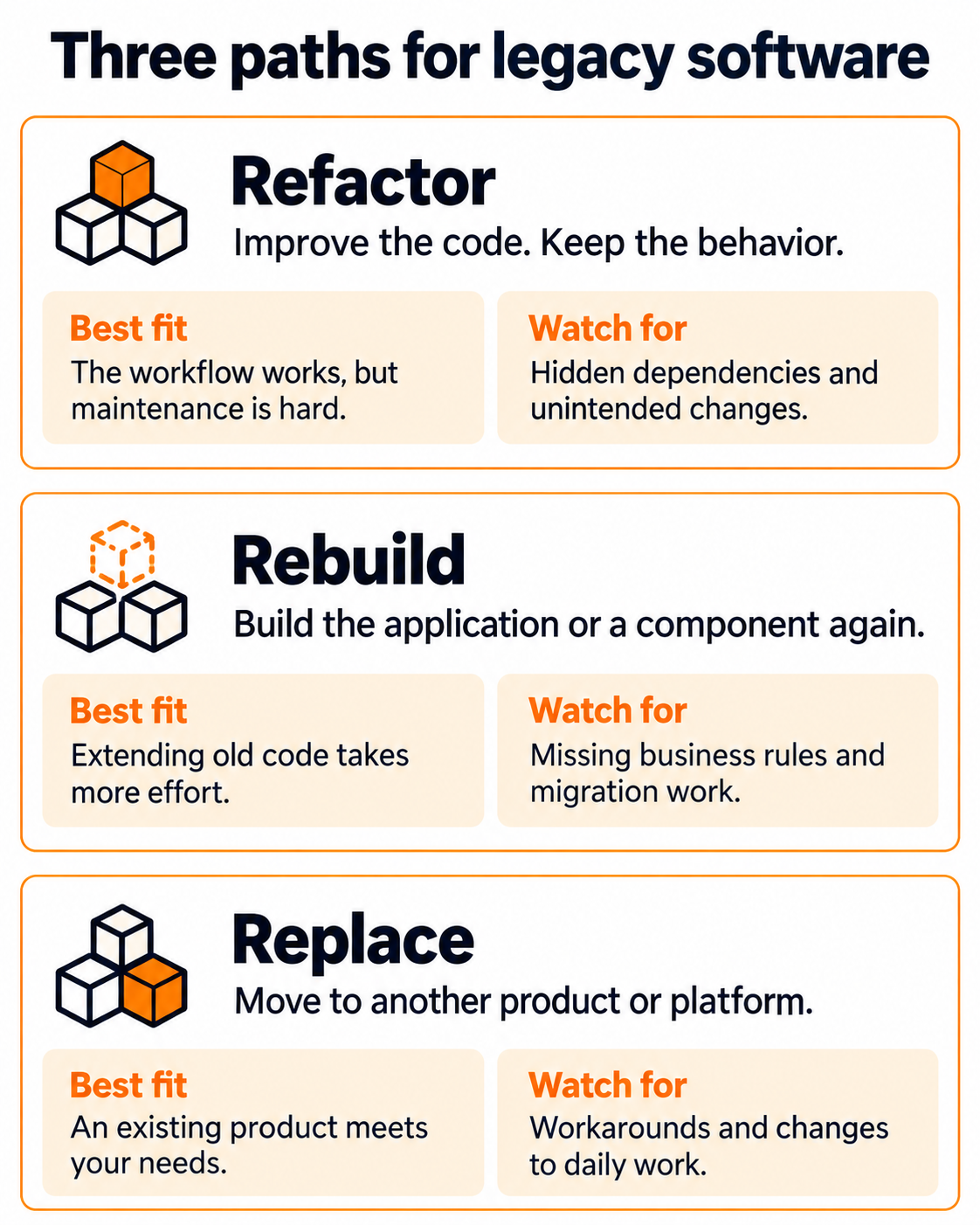
View the comparison at full size.
None is automatically the cheapest or fastest. You can also keep stable components or retire features nobody needs. Moving the same application to the cloud may address hosting problems while leaving its workflow and code problems intact.
Five questions to ask before choosing
Bring together the people who use the system, maintain it, and depend on its information.
Does it still fit the business? Look at where people leave the application to finish work in spreadsheets or email. Is one capability missing, or does the whole process no longer fit?
Can it be maintained safely? Check whether its underlying software still receives support, whether changes can be tested, and whether the team can release updates reliably. Age alone tells you less than the risk involved in a routine change.
What depends on its data? Trace the reports, integrations, imports, and exports that other teams rely on. Check for duplicate records and inconsistent values. A demonstration with clean sample data won’t reveal these problems.
Which business rules are easy to miss? Ask about exceptions: an approval threshold, a customer-specific calculation, or a month-end adjustment. Screens show only part of the picture. Record which behaviors must remain and which workarounds can go.
Who will support the future system? Consider the skills and ongoing effort each option requires. Your team or delivery partner needs to be able to operate, troubleshoot, and improve it after launch.
When rebuilding can be faster and less expensive
We sometimes find this with clients: an application still does the right job, but extending its old code would take more time and money than rebuilding the part that needs to change.
Finding people who know the underlying technology is one challenge. Even an experienced developer may need substantial time to understand unfamiliar code and work out how to connect new features without breaking existing behavior.
When the requirements are clear, rebuilding a defined component can offer a faster, less expensive path. That might mean rebuilding a reporting module or customer portal while keeping the rest of the system.
Compare the full effort on both sides. Modifying the old component includes understanding and safely changing it. Rebuilding includes confirming its business rules, moving any affected data, and connecting it to the remaining system. Both need testing and ongoing support. Keeping the existing code is only a saving if that work adds up in its favor.
What this looks like in practice
Consider two hypothetical examples.
Scenario 1: A pricing module that needs attention
A distributor has an order-management application that staff trust. Most problems occur when changing pricing calculations. The rest of the system is stable, its dependencies are supported, and its integrations are understood.
Recommended starting point: Capture pricing behavior in tests, then improve that part of the application. If investigation shows the pricing code is too difficult to change safely, rebuilding that module may be a better option. Neither finding automatically justifies rewriting the entire system.
Scenario 2: A workflow the business has outgrown
A service business uses software designed for one office and a single approval process. It operates across several locations, and staff coordinate work outside the system because it cannot represent their responsibilities.
Recommended starting point: Test replacement products against the business’s actual workflows. Cleaning up the existing code would leave the workflow mismatch unresolved. If those products require extensive workarounds for essential processes, a custom rebuild deserves consideration. A product that fits those needs well would strengthen the case for replacing instead.
Where AI can help
AI tools can help engineers explore unfamiliar code, draft explanations, suggest changes, and propose test cases. Microsoft’s modernization guidance describes these tools as supporting engineering expertise and accountability.
Their output still needs checking against the running application and the people who know the work. A plausible explanation of a billing calculation is not proof that every exception has been captured.
AI may reduce some development effort, but faster code generation doesn’t remove the work of validating data, testing integrations, or helping people move to the new application. Those activities belong in the estimate whichever approach you choose.
Plan the transition before committing
Start with a small, representative piece of work that exposes a real challenge, such as an integration or a workflow with several exceptions.
Where the application allows it, a staged transition lets you introduce new capabilities while keeping the remaining system running. Old and new components still need to work together during that period.
Before a major switch, agree on:
- What must keep working: tests covering essential tasks and important exceptions.
- How data will be checked: comparisons of records, totals, and relationships after migration.
- How rollout and recovery will work: who moves first, what triggers a pause, and how work resumes if something fails.
- Who accepts the result: a named business owner who confirms it is ready for use.
A recovery plan needs to account for any new data entered after the switch. Returning to the old application should not mean losing that work.
You don’t need to settle on a rewrite before asking for help. Canviz’s custom software and modernization services can help you work through the options. Tell us about your existing application, what still works, and where your team is worried about making changes.